I am using MVVMCross and Xamarin.iOS to build an iOS app and one of the pages we are laying out the UI using MVVMCross’ Fork of Montotouch Dialog (MT. D).
The string Footer property of the Section is bindable and could be set using an MvxInlineBindingTarget<T>. The trouble is that subsequent updates to that Footer property did not cause the Sectionto redraw its Footer. This is not a problem that is specific to MT.D as StackOverflow is full of questions around updating Rows and Footers in UITableViews and MT.D is UITableViews underneath anyway.
After much poking around and trial and error I came up with an alternative Footer property in a derived Section class. See this Gist, https://gist.github.com/munkii/9709dad0bfef4bb43a34
Just spent a few hours wondering why my custom UIView I have created in Xamarin iOS was seemingly ignoring my request to set the BackgroundColor.
There are many many theories on the web but one finally told me to check the Size of the View’s Frame. I had assumed there was not a problem with the View’s height because the UILabels that were SubViews were displaying as I expected
It turns out that the even though the child controls were sizing correctly the containing control had zero 0 height. How very HTML\CSS of it.
This stackoverflow Q&A explains how and why you calculate your own height based on your child items.
I think I have been using decent UI SDKs like Windows8 XAML for too long as it think it is bad that this is not automatically created
Yesterday I had problems adding the MVVM Cross 3.5 (PreRelease) package to a .NET PCL. (See question on SO)
I was getting this compatibility error
Could not install package 'MvvmCross.PortableSupport 3.5.0-beta1'. You are trying to install this package into a project that targets 'portable-net45+sl50+Xamarin.iOS10+MonoAndroid10+MonoTouch10', but the package does not contain any assembly references or content files that are compatible with that framework. For more information, contact the package author.
I tried cutting back the configured targets but Visual Studio kept telling me that the likes of Silverlight 5 were going to be “automatically targeted” because they support the same set of portable APIs. Despite what people say Silverlight 5 would not die  . @slodge suggested editing the csproj file directly to change the targeted profile number. How anyone is supposed to know how to do that based on the error message is beyond me. If anyone can explain a detailed way of diagnosing the “Could not install package…” error messages please add a comment below.
Once I’d changed the TargetFrameworkProfile and “reloaded” the project in Visual Studio the project had “(Updated Required)” displayed next to it.
Visual Studio however did not need updating it was just confused because the project now had a TargetFrameworkProfile of 259 but a TargetFrameworkVersion of “v4.0” these are not compatible and I simply needed to update it to “v4.5”. I discovered this in this Stack Overflow answer. Once I had changed the TargetFrameworkProfile and TargetFrameworkVersion I could add the MVVM Cross Nuget Package.
Hope the next person who stumbles into this area.
When Microsoft shipped the Mango tools for Visual Studio they included Windows Phone Performance Analysis Toolset. This is a memory and cpu profiler specifically developed for Windows Phone 7.
The original docs were IMHO atrocious, really unhelpful. However in the last few months there have been some great articles explaining how to really user the tool and more importantly understand and navigate its output
My 3 favourites are
- Memory Profiling for Application Performance
http://windowsteamblog.com/windows_phone/b/wpdev/archive/2012/02/01/memory-profiling-for-application-performance.aspx - How to: Identify and Fix Common Performance Issues Using Windows Phone Performance Analysis
http://msdn.microsoft.com/en-us/library/hh202932(v=vs.92).aspx - How to: Capture and Analyze Performance Data Using Windows Phone Performance Analysis
http://msdn.microsoft.com/en-us/library/hh202935(v=vs.92).aspx
As many people will tell you I am a miserable old git at times and love a good moan. However I think it only fair to give credit where credit is due. I was updating some code today that used Microsoft’s XmlSerializer and had types decorated with DataContract attributes.
My experience of serialisers and how they give out help via error messages is that clearly the person who wrote it thinks “I am super smart and can write a serialiser from scratch. If you are too stupid to configure your types for serialisation then tough ####.” If you are lucky they will throw an error like “Error occurred.” Great thanks a bunch sometimes they just silently fail Grrrrrr!
Usual problems are no public parameter-less constructor or trying to deserialise read only properties.
Well today I got some great error messages from the XmlSerialiser telling me that I was trying to deserialise a property that had no Setter and that the type I was trying to serialise was now a Known Type. The MSDN docs for the error explained that because the type was inheriting the base class needed to be decorated with a KnownType attribute
Thanks you Microsoft
I am going to be pushing out a new version of my app soon. Whilst the app brings new design, imagery and ads I also took the opportunity to update namespaces and some class names.
Towards the end of my update development I began worrying if data that had already been saved on the device would be compatible with the new code. The last thing I wanted was an unrecoverable crash after the update. After searching around I found this great article Debugging the Update Process for Windows Phone Apps from Doug Holland.
Doug’s a smart guy and he keeps a copy of his previous XAP submissions so that he can test older versions. I on the other hand am not so smart and did not have a copy, dammit! We changed source control provider recently so I couldn’t get from a particular Label either.
I thought all was lost as I could not see how I could get hold of a copy of the published XAP needed to follow’s Doug’s process. Then I found Phone7Market this allows the download and install of Free or Trial versions of published Marketplace apps.
So now I had a the published version of my app and my swanky new version. Unfortunately the version from Phone7Market is the signed version that has a separate product id. This means we cannot simply install it, use it and then try updating it as the Windows Phone Power Tools will not see the two apps as the same app. There is a workaround for this situation.
- Install the published version to the emulator\device using Phone7Market.
- Use the published version as much as is necessary to cause significant data to be stored in isolated storage.
- Using the power tools, connect to the emulator\device, switch to “file browser” view and “GET” the files onto your local machine
- Now deploy the swanky new version, use Visual Studio or whatever you find easier.
- You should now have two app nodes in the “file browser” view. One with a GUID name, that is your published one and one with the name of your app. That is the local debug version.
- With these two folder structures you can “PUT” the files that you “GOT” in step 3 into the IsolatedStorage node of the new debuggable version
- Start up your local app in debug mode and you can check what happens when your new codes tries to load old data files!"
Many thanks to Doug for his original article; to the Windows Phone Power Tools team and to the Phone7Market team. Really useful tools, seeing as it is Christmas I should probably go hit the “Donate” button
Search for “what’s new in WP7 Mango” and you get results that are aimed at consumers with lots of video walkthroughs on stuff like Voice Commands and how to play your favourite tunes in the background.
As a developer I was looking for the official “What’s New” list not some excited geeks review of his favourite feature. Well here it is, What's New in the Windows Phone SDK. I wish I’d read it earlier because maybe I would have noticed the new ShareLinkTask and not wasted my energy fixing my Facebook OAuth code that those toe-rags at Facebook broke!
I am was pretty excited today to see my app had been reviewed on T3.com. Cool! You can download the app on your Windows Phone 7, or via Zune on your PC.
I mentioned AppFuze in my last post called "Filling in the gaps in the Windows Phone 7 marketplace” and how they were filling in the gap for an online listing of WP7 apps. Well Bing have gone and blown that out of the water with their Visual Search, it is freakin awesome. The 3 apps I worked on Ministry of Sound, one for a broad sheet newspaper, and Shoot Shag Marry are 18th, 11th and 23rd in their respective categories.
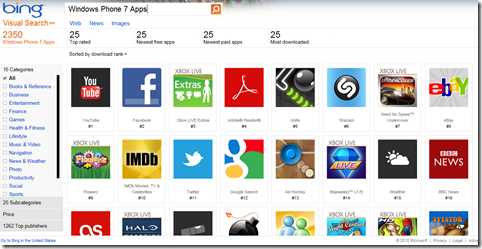
Prefer Google as you search engine? Just look how rubbish the web based Android App Search is. Yes Android is Google’s mobile OS, you would have thought they could have done a better job.
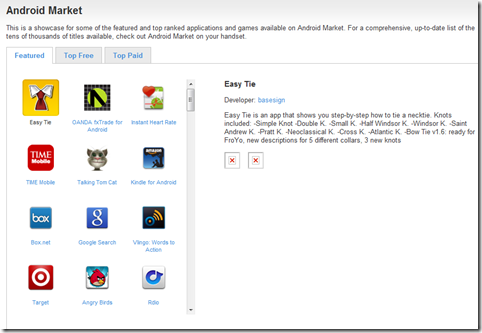
Android Apps search. I f you think that it does not look all that bad in screen shot, go try it, here. There is no Search!!!
Well Windows Phone 7 launch has gone well with the number of apps growing at an excellent rate. However as a user of a WP7 and an app developer there are a few bits currently missing from the Marketplace
Usage Statistics
Download and purchase reports are not due to be available until Jan 2011. We are all going to be anxiously waiting those reports to find out how successful our apps have been. If you cannot wait that long Mark Monster explains how you can use Google Analytics to capture usage information or checkout the Silverlight Analytics Framework on WP7 at Kodierer [Coder].
App Listings
When I was developing for Android I was pretty disappointed by Google’s web based marketplace. At the moment the marketplace for Windows Phone 7 is officially via Zune on the desktop and obviously the phone. Unofficially there is an online browsing of the Windows Phone marketplace at AppsFuze.
App Reviews
There is currently no official way to easily read all the Reviews of your app. The unofficial solution comes from Tom Verhoeff, at Windows Phone 7 AppReviews.